Manga Image Translator

Drop raw Japanese manga pages or Korean strips into our interactive manga image translator. Clean speech bubbles, lock character names, and drag English dialogue freely while raw text stays masked underneath.

1. Upload Your Own Raw Scan
Drag JPG/PNG/WebP pages or press Ctrl+V
Sample Mode · Free unlimited Canvas editing
2. Speech Bubble Typesetter
Bubble #1
Raw: まさか…一撃で結界を破ったのか!?
3. Chapter Character Glossary (Lock Names)
Local Canvas Rendering · Original scans never stored in R2 object storage.
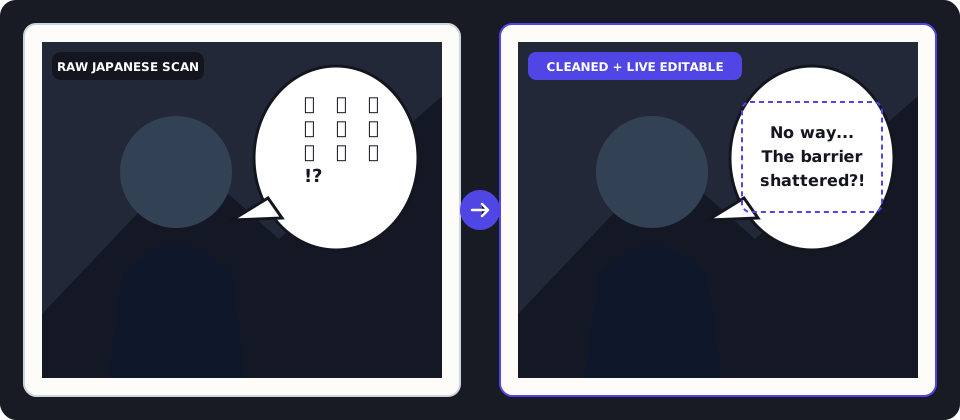
Before and after vertical Japanese manga speech bubble cleaned and typeset into horizontal English in BubbleTranslate
Decoupled mask-and-text architecture: the white elliptical erase mask stays locked over raw vertical kanji while you reposition and resize horizontal English dialogue freely.

How to Translate Raw Scans With This Manga Image Translator

STEP 01

Drop Raw Pages

Select one or multiple JPG, PNG, or WebP manga scans, or press Ctrl+V to paste a panel screenshot directly.

STEP 02

Server-Verified Slicing

Tall pages split into 1600px windows with a 320px overlap buffer, showing slice-by-slice progress as bubbles appear.

STEP 03

Adjust Text & Glossaries

Nudge English text independently of the underlying erase mask, tweak width/height, or undo with Ctrl+Z at zero credit cost.

STEP 04

Export PNG or ZIP

Download high-resolution PNG pages individually or export your translated chapter in a numbered ZIP archive.

Why Generic Photo OCR Fails on Manga Speech Bubbles

Camera translation apps were built for horizontal street signs and menus. Pointed at raw Japanese tankobon pages, generic tools read columns left-to-right instead of right-to-left, scramble character pronouns between panels, and expose raw kanji the moment you nudge a misaligned English text box.

BubbleTranslate was engineered specifically as an interactive manga image translator for raw readers and typesetters. Every pass combines vision-guided speech bubble detection, lockable chapter glossaries, and decoupled Canvas mask/text layers.

Key Engineering Advantages of BubbleTranslate

  • Decoupled Erase Mask & Dialogue Layer: Moving English lines to optically center them inside an oval balloon never drags the underlying erase fill off the raw Japanese characters.
  • Vertical-to-Horizontal Reflow: Narrow vertical Japanese speech columns (縦書き) are read in right-to-left order and wrapped into balanced horizontal lines respecting manual line breaks.
  • Lockable Character Glossaries: Pin protagonist names, clan titles, and recurring terms in the Glossary drawer so every slice uses identical English spelling.
  • True Outlined Text Mode for Action SFX: Choose Outlined Text Only over detailed screentone artwork to draw crisp double-stroked lettering without covering background drawings.

Manga Image Translator FAQ

Why doesn't dragging translated dialogue expose the original Japanese text underneath?

BubbleTranslate separates each bubble into two independent layers: a locked Erase Mask anchored over the detected kanji and a movable English Text Box. You can reposition, resize, or re-wrap English dialogue freely while the raw scan stays cleanly covered.

Do manual edits, font changes, or Undo (Ctrl+Z) cost extra credits?

Never. All Canvas typesetting edits—rewriting lines, adding manual line breaks, resizing text box width/height, switching mask styles, and exporting PNG or ZIP files—run locally in your browser at zero cost.

What happens if an upstream translation call times out or fails?

Credits are protected by an atomic reservation ledger: if any slice fails upstream, reserved credits are automatically refunded to your account balance once and never double-charged.